How to Submit Art to PostcardMania
Submitting your art is easy. Just make sure it meets our artwork specifications, then fill in your information and select the appropriate files to upload using our upload form.
Is Your Art Print Ready?
Digital Images & Logos
Acceptable File Formats | |||
|---|---|---|---|
| File Type | Quality | Program | |
| Prepress Quality | universal file format | ||
| AI | N/A | Adobe Illustrator | |
| INDD | N/A | Adobe InDesign | |
| PSD | 300dpi+ | Adobe Photoshop | |
| JPG | 300dpi+ | universal file format | |
| EPS | N/A | universal file format | |
| TIFF | 300-350dpi | universal file format | |
| BMP | 1200dpi | universal file format | |
NOT Acceptable File Formats* | |||
|---|---|---|---|
| File Type | Reason | Program | |
| GIF | Not enough colors to look good. | universal file format | |
| PUB | Not a layered/print ready art file. | Microsoft Publisher | |
| WPS | Not a layered/print ready art file. | Microsoft Works | |
| WPD | Not a layered/print ready art file. | Word Perfect | |
| *We are aware that some printing companies accept these file formats. The reason we don’t accept them is simply because the final product does not come out as well with these low quality formats. These images are not a high enough quality to produce a superlative printed postcard. We are only interested in providing the most superior product possible. | |||
PLEASE DO NOT ASK US TO USE IMAGES PULLED FROM A WEB SITE. They may look okay on your monitor and inkjet printer, but they are low-resolution and will print poorly on a four-color press. Provide us with a high-resolution image whenever possible, or a good copy, and we will scan it for you. The better the quality of the original image, the better the quality of the finished product.
Stock Photos
PostcardMania® has a large selection of photos and images in stock. We will do our best to accommodate you with our images. If we can’t, we’ll let you know. If you have something special in mind, you can purchase a photo easily right from the internet.

You can find the photos you want to use for your design at stock.adobe.com. Once you have found the images you want to use, give us the “File #“, which is located below the image preview, as well as in the bottom right corner of the image.
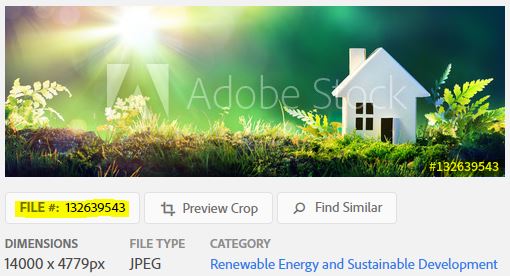
Important: Make sure the images you buy are at least 300 dpi or approximately 9MB in size for a 6 x 4.25 Postcard. We also suggest using “Royalty Free” images to keep your costs down.
Scans
Scan photos as close to the finished size as possible. Resolution should be 300-350 dpi. Scans at lower resolutions may print fuzzy and scans at higher resolutions may be cumbersome as files are large with no added quality. One Color Bitmap images should be scanned at 1200 dpi.
Be sure to obey copyright laws when scanning printed pieces and get permission in writing when necessary.
Note: When scanning from a PRINTED piece, the scan will show ink dots that result in a poor quality image. Try to use original art whenever possible.
Digital Cameras
Digital technology has progressed to the point where most new smart phones and digital cameras will produce high resolution photos that can print with excellent results. If you have any doubts, please send your file to your account manager to be checked. You can upload it here.
If you have questions about what is acceptable, or not, please contact your Campaign Coordinator. 1-800-628-1804